// flying / physics / arcade
Fumbleboost
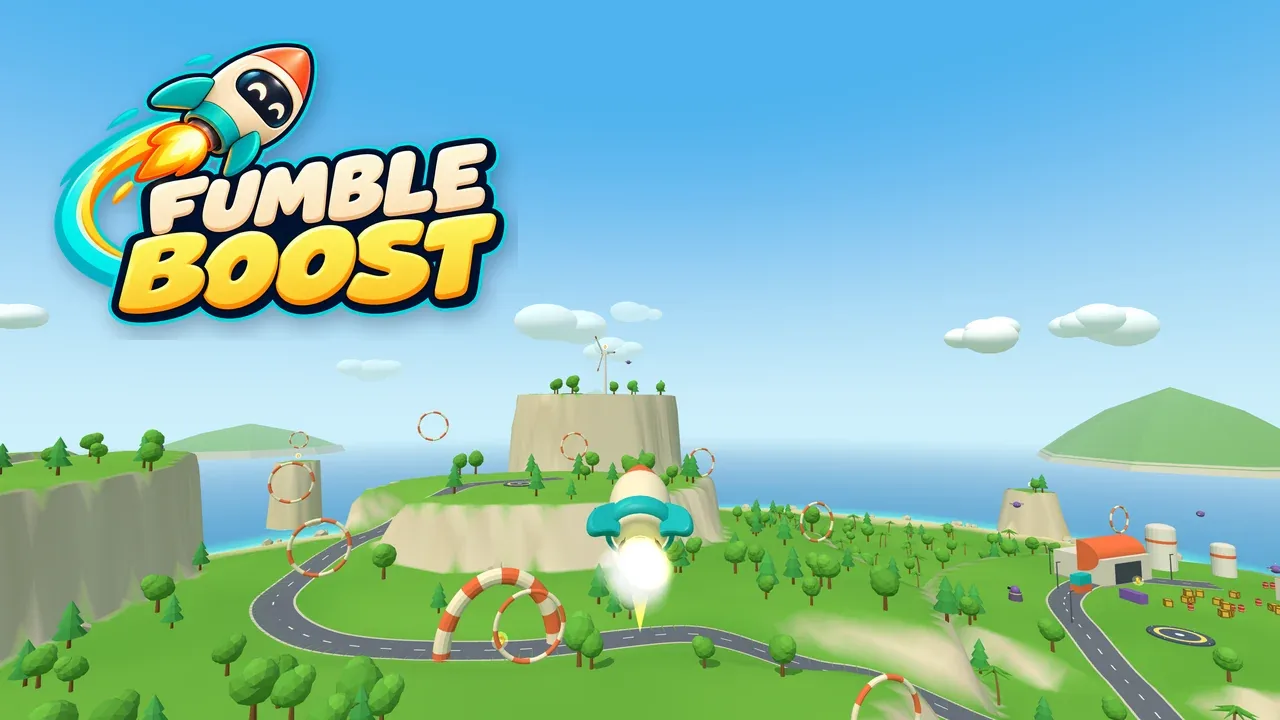
Fly a tiny, overexcited rocket around a bright toy island. Steer on the left, boost on the right, loop the loop, land on pads, and smash crates, trees, buildings and purple robots. Crash and your rocket breaks into real pieces, which stay where they fell.
▶ Launch gameDesigned for mobile, tablet, desktop
About the game
Fumbleboost is a playful 3D rocket physics game built for a phone. Steer on the left side of the screen and hold the right side to fire the engine; each works on its own, so you can turn while coasting or boost without touching the stick. In landscape you get a visible stick and engine button; in portrait the screen stays clear. The camera settles back behind the rocket after every turn, fine stick movements give fine adjustments, holding the engine lights an afterburner, letting go deploys air brakes, and a landing beacon cushions you gently onto pads. Tap the eye button for a first-person view from the nose, or an Auto view that flies in first person and switches to the chase camera for take-off and landing. On a computer, move the mouse to aim and hold the button to boost. In the chase view turning never snaps your speed to the nose, so you fly arcs, carry speed into loops, and flip round and pulse the engine to brake for a soft landing; in first person you fly exactly where you point. While boosting, drag your finger down to ease the engine back.
The island is yours to explore from the first second: a launch meadow, rolling hills, a summit with a wind turbine, an east depot with a hangar, tanks and a pier, a narrow canyon, a rock arch over the sea, and a scatter of islets and sea stacks. Thread hoops and arches, blast down the Zoom Lane's speed rings, thread tiny needle rings, fly through rings backwards or side on for trick points, bounce off Boing Bumpers, chase twelve hidden golden bolts and grab Sparks to patch your rocket up. And there's no ceiling: keep boosting upward and the island curls into a little planet below you. Up there the Space Run waits: twelve star shards hidden in an asteroid field, junk on its orbits, a satellite to smash, and swirling warp portals to take you home.
Collisions have consequences. Your rocket can take a few knocks before it pops. Small trees snap as you plough through them, big trees and heavy boulders can stop you dead and still come down or roll away, buildings fall apart, and barrels and tanks set off chain reactions. When you crash, the rocket breaks into its real nose, shell, visor, fins and engine in the colours you were flying, and that wreck stays put until your next crash. Purple Peepers, Grumble Guns, chasing Clingons, beeping Pop Mines and patrolling Tankers keep things lively, and the rocket itself is the weapon. Fly near a robot and red brackets lock on to it; swipe up on the boost button and the rocket burns straight at it (steer to swerve round shots), then bounces clear. Fly the Robo Purple skin and the robots think you're one of them.
Seven short missions mix it up: hunt down drones and turrets, smash marked crates, race a ring course that flows round the hills, dash through canyon gates, and hop between landing pads. Each has gold, silver and bronze times. Loops, near misses and clean landings score along the way, twenty badges reward everything from your first loop to a gold on every mission (two of them are secrets), and seven rocket skins unlock through ordinary play. Surf, gulls, birdsong and robot chatter fill out the island.
The title screen has its own theme tune and a show-off rocket looping over the island. Install it to your Home Screen and it plays offline. Progress and settings are saved on your device only.
This is a development build: it is playable end to end, but has not yet been tuned on a real iPhone.
How to play
- Tap Free Flight to fly straight away, or Missions for a short objective.
- Steer on the left: in landscape drag the stick, in portrait drag anywhere on the left half. Left and right turn, up and down pitch; keep it held to keep rotating, which is how you loop.
- Boost on the right: hold the engine button (landscape) or anywhere on the right half (portrait) to fire the engine. Keep holding and the afterburner lights: more thrust, more speed, more danger. Lift to coast. Steering and boosting work independently, in any order. While holding, drag your boost finger down to ease the engine back (a gauge shows how much) and back up for full power: handy for hovering and gentle landings.
- Tap the right side for a short pulse. To brake, point the nose back against your motion and boost: the engine bites harder that way. Or just let go of everything: air brakes bleed off your sideways speed.
- Drag up tips the nose forward (in first person, up tips the nose up). Each camera view has its own up/down setting, so you can flip either or both; Settings also has steering sensitivity and the older One finger: hold to boost layout.
- On a computer, move the mouse to aim and hold the button to boost. The first click captures the mouse; Esc releases it and pauses.
- Land upright and slowly on a pad for bonus points. Bumps cost health (a bar appears under the objective) and it recovers if you fly clean for a moment; Sparks heal. Hit something too hard and you explode, then respawn at the nearest pad.
- Coming down onto a pad, a beacon ring lights up and turns green when you're slow and upright. Let go and it cushions you down gently onto the middle (land dead centre for a BULLSEYE); hold the engine for a gentle climb.
- Near a robot (or a mission crate) in plain view, red brackets lock on to it and red arrows rise from the boost button. Swipe up on the boost button (or anywhere on the right half in portrait) and the rocket burns hard at it; steer to swerve round shots, then let go to swing back on. On a computer press F or right-click.
- Wear the Robo Purple skin and robots leave you alone: they think you're one of them.
- Ram drones, turrets, crates and barrels to destroy them; crates even burst if you whoosh past close and fast. Drones flash red before they dash; turrets and Tankers show a charge before they fire; Pop Mines beep before they blow; Clingons chase you, so lead them into a tree or a hill.
- Small trees and loose rocks break and move if you hit them hard enough. Your last wreck stays where it fell. Pause → Reset island puts everything back.
- Keep climbing past 750 m to reach space and start the Space Run: collect all twelve star shards (the arrow points to the nearest), dodge asteroids and orbiting junk, smash the satellite if you like, then fly through a warp portal to get home. One opens when you finish; another waits high above the field.
- The eye button (top right, or V on a keyboard) cycles the chase camera, first person and Auto. Auto shows the chase camera on the pad and while landing, and first person once you're properly flying; it handles the same way in both, and up/down follows whichever view is showing. First person looks exactly where the nose points (straight up on take-off), the small cross in the middle is your aim, and you fly where you point: your momentum swings round to the nose much faster than in the chase view
- Rings: teal Zoom rings over the south sea give you a burst of speed; small purple needle rings are worth more if you can thread them. Through any ring, tail first scores BACKWARDS, nose across the ring scores SIDEWAYS, and over 45 m/s scores HOT. During a ring course every other hoop fades back so the next ring stands out.
- Badges on the title screen show what you've earned and how close you are to the next ones.
Credits & rights
© 2026 Tommy Cunningham. All rights reserved.
Game design, code, physics, 3D models, sound effects, the music loop and the title theme made for Fumbleboost, with Claude (Anthropic).
Fumbleboost logo and app icon artwork supplied for the game.
3D rendering: three.js r186 (MIT licence), bundled.
Sound and music are synthesised live with the Web Audio API; there are no sample files.